Monday Smartphones Recap

. Monday, June 9, 2008
0 comments

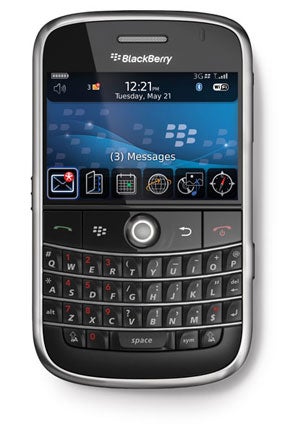
So Lets summarize some of exciting gadget news so far I gathered today. Well, beside all known expected iPhone 2.0 aka 3G to be announced at WWDC 2008 conference by Steve Jobs, couple of other gadgets managed to catch my attention:

Now is it just me or all the phone mentioned above have "something" in common?

In other news, something I almost completely missed, new smartphone from Nokia - E71. TheBoyGenius posted full review here
This one still hasn't decided what it wants to be iPhone or Blackberry clone, but most closely match Blackberry bold

TheBoyGenius just made full HTC Diamond Touch review, which I'd like to quote:

"While this isn’t specific to the Touch Diamond, we really wish HTC would reconsider their all-in-one min-USB jack. It’s great for charging and file transfers, but especially considering the media-centric appeal of the Diamond, we would appreciate a 3.5 mm headphone jack, as the current configuration limits you to the HTC-supplied headphones unless you’re willing to deal with a cumbersome adapter."

Rings a bell? Something I said back in May - http://boredsysadm.blogspot.com/2008/05/why-htc-diamond-touch-will-fail.html
Told you so! Full review here

Speaking of HTC Diamond Touch - It's not tri-band HSDPA as you'd like to be, HTC says device will localized due to size constrains.

-----------------

Solution: Microsoft Update Fails on Office Updates on Win XP SP3

. Friday, June 6, 2008
0 comments


Do you have Issues updating Microsoft Office 2003 via Microsoft Update (not windows update) after WinXP Pro has been updated to SP3?
Here are two solutions:

First:

and Second:
Delete contents of the software distribution download folder at C:\Windows\SoftwareDistribution\Download and then run this script at c:\windows\system32 folder

regsvr32 /s Wups2.dll
regsvr32 /s wuapi.dll
regsvr32 /s wuaueng1.dll
regsvr32 /s wuaueng.dll
regsvr32 /s wucltui.dll
regsvr32 /s wups2.dll
regsvr32 /s wups.dll
regsvr32 /s wuweb.dll

Breaking: Amazon Web site is down since mid afternoon Friday (Update)

.
0 comments


icon

When a service as big as Amazon (AMZN) is unavailable, you expect at least a message along the lines of “something is technically wrong.” However, currently Amazon is as dead as it can be, with Amazon.com producing a mere “Http/1.1 Service Unavailable” error message.

I'm usually cautious about writing reports on sites being down because they have the nasty habit of returning to normal as soon as I hit “publish.” However, Amazon seems to have been down for quite a while now, and reports are showing up on other sites, for example CNET. There is no official word from Amazon about this outage at the moment. Let’s just hope their data centers didn’t explode.

Update As of 4:20pm EST Amazon servers fully operational and working in regular mode.

Update
Is Amazon Video to blame?

HP Charges an Arm and a Leg for Printer Memory Upgrades

. Wednesday, June 4, 2008
0 comments

Today of my company's managers complained to my boss - infrastructure manager about his print job sometime getting stuck at the printer.
He's currently using as personal printer HP Laserjet 1300n something model, you know compact, w/o even lcd screen.
Since this person is probably a 2nd most important person in multi-million company my manager decides to make him happy we just going to buy him a new, more powerful model.

HP LaserJet P3005dn fitted the needs and bill perfectly. Currently in ballpark of $449 with HUGE $400 off promotion running until end of July.
Next step is attempt to beef up the printer even further we decide to expand the memory and this where we hit the brakes.

Whooa !! $599 [US] for 256mb!!!!

I couldn't believe my eyes !! Remember then I told you about HP just rebrands the memory its sells and charges extra, but this comes as a shocker even to me, a seasoned IT veteran.

40 TIMES Markup !!!


Even a simple HP product number search will reveal same or compatible item for under $40
A bit more digging around I found out HP uses standard notebook memory modules for this printer, more specifically: DDR2 PC2-3200 144 Pin SO-Dimm.
Here and here you can purchase it for $14.99 and they even tell you it's HP Printer compatible :)

How To Disable Credentials Prompt of Remote Desktop 6.0 [RDP] - Updated

. Tuesday, June 3, 2008
11 comments

--> Update: Since I posted this little article Windows XP Service Pack 3 came out and brought with it a whole new version of RDP client which finally works right, saves credentials, and does well all round, Including built-in support for NLS – Effectively makes article below obsolete.
Remote Desktop Connection client 6.0 introduces new authentication features to improve security for Windows Vista and Windows Longhorn Server, which makes it mandatory for the user to enter login credentials before RDP client can establish a connection to the remote server (" Enter your credentials for <server>. These credentials will be used when you connect to the remote computer" ), but if the remote machine is configured to show logon warning message or if the remote system happens to be Windows 2000 or XP, you’ll need to enter the credentials again at remote machine’s login screen.


There is however a workaround to skip the credentials screen that RDP 6.0 client shows by choosing “Do not attempt authentication” under Authentication options on the Advanced tab, but this option is not set permanently.

To permanently skip the additional credential screen of RDP 6.0 client, edit the Default.RDP file in notepad to include enablecredsspsupport:i:0 .
The Default.rdp is located in each user’s My Documents folder.
Including enablecredsspsupport:i:0 disables the Credentials Security Service Provider for the connection.
If you use a separate .RDP file for different servers, modify each of those.RDP files.
Below is the content section of the default.rdp file with enablecredsspsupport:i:0 option included.
redirectposdevices:i:0
authentication level:i:0
enablecredsspsupport:i:0
prompt for credentials:i:0
negotiate security layer:i:1
Note that this workaround is suggested only if you connect Windows 2000/2003/XP systems because according to Terminal Services Team blog post“This option does disable the new credential prompting behavior, but it also disables support for Network Level Authentication for Vista (and Longhorn Server) RDP connections; Network Level Authentication requires credentials to be provided by the client before a session is created on the server side.”

So if you do connect to Vista/Longhorn over RDP, you’ll not be able to use this tweak.